Wednesday, October 8, 2008

WPF Templates

WPF introduces the concept of lookless controls.

Using Templates it is possible to change the appearance of a control. For examples it is possible for a ListBox to contain the Photos of employees instead of the usual List Items.

I am going to demonstrate creating a simple Template whereby a button will appear as a blue rectangle.


Silverlight Tags

<UserControl x:Class="ButtonTemplate.MainPage"
    xmlns="http://schemas.microsoft.com/winfx/2006/xaml/presentation"
    xmlns:x="http://schemas.microsoft.com/winfx/2006/xaml"
    xmlns:d="http://schemas.microsoft.com/expression/blend/2008"
    xmlns:mc="http://schemas.openxmlformats.org/markup-compatibility/2006"
    mc:Ignorable="d"
    d:DesignHeight="300" d:DesignWidth="400">

    <Grid x:Name="LayoutRoot" Background="White">
        <Button Height="50" Width="75">
            <Button.Template>
                <ControlTemplate>
                    <Rectangle Fill="LightBlue"/>
                </ControlTemplate>
            </Button.Template>
        </Button>
    </Grid>
</UserControl>


Result


As shown in the output the button can respond to click event as expected.

Now lets create an ellipse button.


Result

Monday, October 6, 2008

WPF Styles

Styles are equivalent to CSS in html. Lets see how to create Styles in WPF.Inside the Window Xaml tag add a Window.Resource section.In the Style tag's TagetType you can specify to what type of control you want the style to apply. Using Setters you can specity the Property and and its corresponding value.


Here is the result


In this example I am setting the Background, Width and Opacity properties for Button. All the buttons in the form will inherit these properties thereby rendering a consistant look and feel.

Wednesday, September 3, 2008

Asp .Net Validation Controls

Client Side validation is an important task in Web Application development. All server side technologies except Asp .Net expects the programmer to be conversant with JavaScript, the default client side scripting language. Asp .Net comes packed with a number of validation control which emits javascript thus making the life of programmer easier.

RequiredFieldValidator
RequiredFieldValidator can be used to check whether a value is entered into a control.
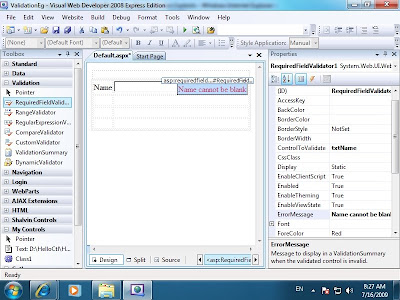
Place a RequiredFieldValidator next to the control you want to check for the extistence of value.
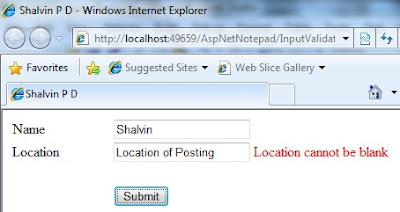
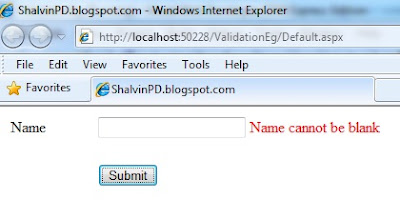
Set the ControlToValidate Property to the Control you want to validate. Set an appropriate errror message using the ErrorMessage property. If you submit the form without entering the a value to the TextBox the use will receive an error message.


Result


RequiredFieldValidator InitialValue

Suppose you want to display an additional message inside the textbox and that text shouldn't be treated as an input text. Then you can set the InitialValue of RequiredFieldValidator to the text that is displayed in the textbox.


CompareValidator
CompareValidator can used for :
i. checking the type of contents in a control, for example whether the value entered is numeric.
ii. Check for equality of the contents in two controls, for example checking the text of Password and Reenter Password textboxes.
iii. Checking whether the values of two controls are greater than, lesss than, etc. for example wheter the value entered in Bid textbox is greater than the value in Price textbox.


OperatorCheck Property

i. Lets take up the first scenario. We want to check whether the value entered into a control is numeric.


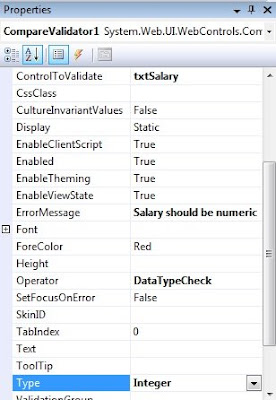
As usual add a CompareValidator next to the control you want to validate. Set the ControlToValidate and ErrorMessage as in the case with RequiredFieldValidator. Set the Operator property to DataTypeCheck and Type to integer.


Now if the end user happens to enter a non numeric value he will receive an error message specified in the ErrorMessage property.


ControlToCompare Property

ii. Let's take up the scenario of checking the equality of values entered in two controls as in the case with Password and Reenter password textboxes.


Here set the ControlToValidate property to Re enter password textbox's id and ControlToCompare to the password textbox's id.


iii. In the case of third scenario where the Bid Amount should be greater than Price amount, set the ControlToValidate to Bid textbox's id and ControlToCompare to Price textbox's id. Next set the Operator to GreaterThan and Type to integer.


RangeValidator
RangeValidator
can be used to check wheter the value entered into a control falls under a specific range. For example we can check wheter the age is between 35 and 60. In this case apart form ControlToValidate and ErrorMessge set the MinimumValue and MaximumValue property to 35 and 60 respectively.


ValidationSummary


Instead of displaying error message side by side the textbox, it can be displayed as summary. For this you can use ValidatiorSummary control. Place a ValidationSummar Control on the form having validation controls. Set the Text Property of Validation Controls to say *. All the controls that fail the validation text will display * as shown in the figure.

Asp .Net Ajax VII : AlwaysVisibleControlExtender


With Ajax .Net we can easily make a part of the page always always visible. An example of Always visible content is the gmail's Sending message as you sent a message. Even if you scroll down the page the Sending message will be visible.


Lets see how to implement it in Asp .Net.

Open an Ajax Web Page.

Add a Panel set a BackColor and a Text.

Add an AlwaysVisibleControl Extender. Set the TargetControlId to the Panel control and HorizontalSide to Right.

Friday, August 22, 2008

WPF Layout with Grid

WPF layout system helps in having fine grained control over the placing of controls.

Since I am more into the web domain I am most comfortable with the Grid which is the most versatile of the built in layout panels available in WPF.
Grid mimics the familiar html Table tags.
Here I am creating a Grid with 3 rows.


I am add two columns using ColumnDefinitions.


Now if a add a button to the Grid it will appear in the first row and column (zero based index). If I again add one more button to the grid the second button the take the precedence and hides the first button. It is possible to specify in which column the control should appear using Grid.Column and specifying the column number as sholwn in the figure below.


We can also specify the column number using Grid.Column.


 <Window x:Class="WPFLayout.MainWindow"  
     xmlns="http://schemas.microsoft.com/winfx/2006/xaml/presentation"  
     xmlns:x="http://schemas.microsoft.com/winfx/2006/xaml"  
     xmlns:d="http://schemas.microsoft.com/expression/blend/2008"  
     xmlns:mc="http://schemas.openxmlformats.org/markup-compatibility/2006"  
     xmlns:local="clr-namespace:WPFLayout"  
     mc:Ignorable="d"  
     Title="Shalvin" Height="450" Width="800">  
   <Grid ShowGridLines="True">  
     <Grid.RowDefinitions>  
       <RowDefinition Height="50"/>  
       <RowDefinition Height="50"/>  
       <RowDefinition Height="50"/>  
     </Grid.RowDefinitions>  
      <Grid.ColumnDefinitions>  
        <ColumnDefinition Width="150"/>  
        <ColumnDefinition Width="150"/>  
        <ColumnDefinition Width="150"/>  
      </Grid.ColumnDefinitions>  
     <Button>Shalvin.com</Button>  
     <Button Grid.Column="1">shalvinpd.blogspot.com</Button>  
   </Grid>  
 </Window>  

Thursday, August 14, 2008

Wpf and Windows Forms Controls Interop

Though WPF is a Wonderful technology, at times programmers get frustrated with the lack of certain controls. One such control is the DataGrid or GridView. Silverlight 2 infact has a DataGrid, hope in the next release of WPF it will be as feature rich as Windows Forms.

It is very much possible to use Windows Forms controls in WPF.

Start out by dragging a WindowsFormsHost into WPF Windows.


Create an object of System.Windows.Forms..DataGrid and set the Child Property of WindowsFormsHost to the newly created DataGrid object. WindowsFormsHost can have only one child as is obvious form the Child Property.

System.Windows.Forms.DataGrid dg = new System.Windows.Forms.DataGrid();
private void Window_Loaded(object sender, RoutedEventArgs e)
{
windowsFormsHost1.Child = dg;
}

Now you can work with the DataGrid just like you work with it in Windows Forms.

Here is the complete code for connecting the DataGrid to a DataSet.

using System.Data;
using System.Data.SqlClient;

using System.Windows.Forms;

System.Windows.Forms.DataGrid dg = new System.Windows.Forms.DataGrid();

SqlConnection cnn;
SqlDataAdapter da;
DataSet ds = new DataSet();
private void Window_Loaded(object sender, RoutedEventArgs e)
{
windowsFormsHost1.Child = dg;

cnn = new SqlConnection(@"Integrated Security=sspi;Initial Catalog=Shalvin;Data source=.\sqlexpress");
cnn.Open();
da = new SqlDataAdapter("select * from Categories", cnn);
da.Fill(ds, "Cat");
dg.DataSource = ds.Tables["Cat"];
}

Sunday, July 6, 2008

.Net Code Access Security Introduction

CAS is the programatically means by which you secure the resouce of a system like file system, printer, registry, etc. in contrast to Role Base Security (RBS).

RequestOptional is used to grant permission to a resource.
RequestRefuse is used to revoke permission to a resource.

In following example I am going to restrict writing to C drive. Incase if user tries to write to C drive programatically he is receive an exception.

using System.Security.Permissions;
using System.Security;
using System.IO;

[assembly: FileIOPermissionAttribute(SecurityAction.RequestRefuse , Write="c:\\")]namespace WindowsFormsApplication1
{
public partial class Form1 : Form
{
StreamWriter sw;

private void button1_Click(object sender, EventArgs e)
{
sw = File.CreateText("c:\\Shalvin.txt");
sw.WriteLine("Hello");
sw.Close();
}


For a detailed coverage of Code Access Security refer http://www.codeproject.com/KB/security/UB_CAS_NET.aspx
Courtesy : Jeevan Baby, Indiaoptions

Thursday, June 26, 2008

My .Net Videos in Youtube/Google videos

Asp .Net Ajax Videos
Asp.Net Ajax II : TextBoxWatermarkExtender
Asp .Net Ajax III : ConfirmButtonExender
Asp .Net Ajax III : SliderExtender
Asp .Net Ajax V : MaskEditExtender


Asp .Net 2.0 Membership Vidoes
Asp.Net 2.0 Membership I : LoginStatus LoginName
ASP.Net 2.0 Membership II : LoginView Control
ASP.Net 2.0 Membership III - CreateUserWizard
ASP.Net 2.0 Membership IV Roles
aspnet_regsql : Adding Membership tables to Sql Server
WPF
WPF I : Button - Shalvin
Asp .net State Management
Asp .Net Query String
ASP.Net (VB.Net) Session Variable ArrayList
Asp .Net Profile


Asp .Net Controls
Asp.Net I : Introduction and Button Control
ASP.Net Controls - II : TextBox
Asp.Net III : ListBox Inline Page Mode IsPostBack
Asp.Net IV : Label AssociateControlId AccessKey
Implementing Date Selection Functionality using Multiple Combo Boxes
C#
String.Format
C# Error Handling - Shalvin P D
VB .Net
VB.Net 2008 Controls III :ListBox
VB .Net 2008 Controls V : NumericUpDown
VB .Net 2008 Controls VI : Simple Calculator

Google Videos
Creating Window Service in C#
C# (Windows Forms) MultiThreading


WPF Creating Class C#
Ado .Net
Introduction to Ado .Net
Ado .Net ExecuteScalar
Asp .Net
Displaying DataReader Contents in a RadioButtonList

Asp.Net (VB.Net) DropDownList DataTextField DataValueField

Asp.Net (VB.Net) Displaying DataReader contents in a RadioButtonList

ASP.Net DataList HyperLink with Wizard
FileUpload Control
Asp.Net C# DataSet GridView

ASP.Net (C#) Tracing

Asp .Net 2.0 Membership videos
ASP.Net Membership Authentication, Authorization and Role based security
Asp.Net 2.0 Membership V Denying Anonymous users
Asp.Net 2.0 Membership VIII Protecting a folder


C# Windows Forms
PrintDocument and PrintPreview Control

Gdi+
I : DrawString DrawLine
II : FillRectangle FillEllipse
III : Custom Pen
IV : HatchBrush
V: Color.FromArgb
VI :ScreenSaver : Random Class and Timer Control

VII : Working with Bitmaps

Gdi+ (ASP.Net) XII : Bitmap DrawString

Multithreading and Miscellaneous
Multithreading in Windows Forms
Code Access Security

Compression and Decompression in .Net
Win32 Api Visual Basic 6 : SwapMouseButton
Reflection in .Net : Displaying all properties, methods and events of a type


Xml
XmlDocument in VB .Net

Extracting xml from Sql Server tables

Sql Server
Sql Server 2005 : Creating Tables and Relationships (Sql)
Sql Server WHERE Clause and Stored Procedures
Web Service
Creating and consuming Web Service
Web Parts
Asp .Net Web Parts : Design Mode and Brose Mode